Maze designer
Design a maze on squared paper, write the program that solves it, then swap with a partner and see if their program works on your maze.
- You'll use
- Paper, then Practice Coding
- You'll learn
- Sequencing, debugging, planning
 CodeQuestPlay · Think · CodeStaff
PROJECTS · 28 IDEAS TO BUILD
Example projects for every age and every area. Pick one that excites you, or use one as a starting point for your own idea. The level shows where most pupils start, but if a project looks fun, have a go.
Levels: Explorers 6–9Builders 9–12Challengers 12–15Seniors 15–18 "+" means "and older".
Software & algorithms in the Python lab.
Design a maze on squared paper, write the program that solves it, then swap with a partner and see if their program works on your maze.
Use loops and print() to draw stairs, pyramids and checkerboards out of text characters. Can you make one loop draw any size?
for loops, nested loops, parametersWrite a single Python program, using sensors such as can_move_left(), that reaches the goal on every mission without being changed.
while, if / else, algorithmsRepresent a maze as a grid in Python and find the shortest route with breadth-first search. Compare it with the left-hand rule.
Real web pages in Web Lab.
Make a birthday or thank-you card for someone real. Choose the colours, fonts and message, then show it to them.
A page about something you love: a sport, a game, a pet or a book. Use headings, a list, a picture and your own colours.
A multiple-choice quiz that keeps score and says "well done" at the end. Test it on a younger pupil.
ifA site for a real school club or event, with a gallery, the key details and a clear layout that works on phones.
A personal site showing off your best club projects, built from a blank page. Check it works with a keyboard and a screen reader.
ESP32 and MicroPython. Until kits arrive, every project here can be built in the free Wokwi ESP32 simulator.
Three LEDs that change in the right order, with the right timing. Add a button for a pedestrian crossing.
A light that turns itself on when the room gets dark, just like wall_ahead() but with a real sensor.
ifAn LED lights up after a random wait. Who can hit the button fastest? Keep a high score.
Measure temperature and light, then have the ESP32 serve a web page showing the live readings.
A two-wheeled robot that drives a maze taped on the floor using the same forward(n), left() and right() commands as CodeQuest.
Defend by understanding attacks.
Design posters that teach younger pupils the warning signs of a scam message, then put them up around school.
A Python program that scores a password on length, variety and common words, and explains how to make it stronger.
Work through OverTheWire Bandit and keep a logbook of each level: what you tried, what worked, and the command you learned.
Review a classmate's Web Lab page (with permission): could user input break it? Write up what you found and how to fix it.
Form a team and enter picoCTF, a free capture-the-flag competition for school students.
Future consideration.
Train a model to recognise your hand shapes with the webcam, then play against it.
Train a model on deliberately unbalanced examples and watch it get things wrong. Then fix the data and compare.
A robot that learns a maze by trial and error and gets faster each time. Compare it with your hand-written solver.
Contribute to real projects.
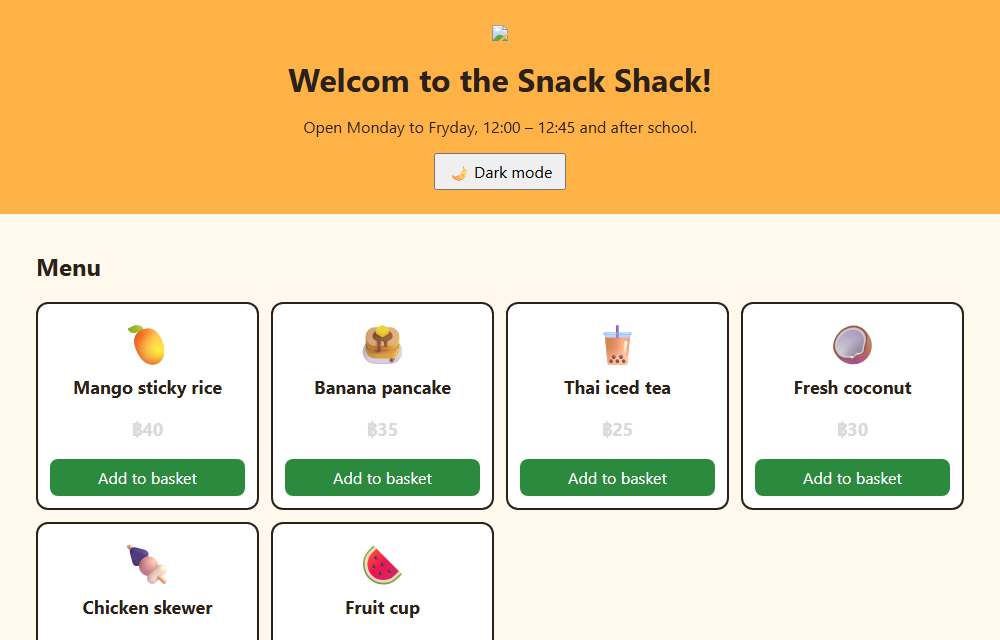
Our own deliberately broken school tuck-shop app, with 17 bugs to hunt. Spelling slips and broken pictures for beginners; maths bugs, a Python leaderboard, a traffic light and a security hole for older pupils. Fix one, then send it in as a real pull request.
Follow the First Contributions guide to make a real (safe) contribution on GitHub, step by step.
Find a beginner-friendly issue on Good First Issue and fix it. Documentation and typo fixes count.
Capstone ideas that mix two or more areas.
A website that teaches younger pupils to spot scams, with a quiz at the end.
A web page that shows live readings from your hardware, with charts and alerts.
Hardware, Software and Cyber stream pupils build a maze robot together, then try to secure it against each other.
Safety first: cyber projects are only ever done on systems you own or have written permission to test. Projects that use outside sites (GitHub, picoCTF, Bandit, AI tools) are done with a teacher's or parent's permission and follow each site's age rules.